
Download Addon SCP Foundation – SCP, Mobs, Custom Items, Minecraft, Android
Overview
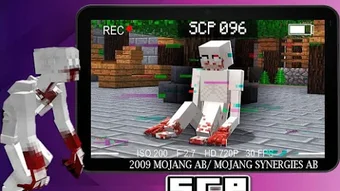
The Addon SCP Foundation is a mobile application designed for Android devices, developed by Rudio Studio Craft in the Education & Reference category, specifically within the Books subcategory. While marketed as a Minecraft add-on, the application functions as a standalone experience that introduces elements from the SCP Foundation universe into gameplay. It features a range of entities from SCP – Containment Breach, including iconic characters such as SCP-173 and SCP-049, each with unique behaviors and abilities.
SCP-173 remains immobile when observed directly but becomes dangerous when the player blinks, exploiting visual perception mechanics. SCP-049, known as the Plague Doctor, infects villagers, transforms them into zombie villagers, and inflicts a wither effect on players, mimicking the game's hostile mechanics. The add-on also includes retextured blocks and non-anomalous items, enhancing visual immersion.
It is important to note that this application is not affiliated with Mojang AB or the official Minecraft platform. All intellectual property, including names, characters, and locations, belongs to their respective owners. The tool is intended for fans of the SCP universe and Minecraft-inspired gameplay, offering a narrative-driven, survival-focused experience on mobile devices.
Key Features & Capabilities
- SCP Entity Integration: Includes multiple SCPs from the SCP – Containment Breach universe, such as SCP-173 and SCP-049, each with distinct behaviors and attack patterns.
- Visual Enhancements: Features retextured blocks and custom item designs that improve the aesthetic quality of the in-game environment.
- Interactive Gameplay Mechanics: Introduces unique mechanics like the blink-triggered attack of SCP-173 and the infection system used by SCP-049.
- Custom Items and Weapons: Offers functional guns such as the P-90 and AWM, complete with 3D models and the ability to hold a firework in the offhand during use.
- Trading System: Allows players to trade for ammunition, enabling resource management and strategic planning during encounters.
These features combine to create a tense, immersive experience where players must navigate a hostile world filled with unpredictable entities. The integration of SCP lore into a mobile gameplay framework allows fans to explore the dark, surreal atmosphere of the SCP universe through interactive mechanics. The ability to trade for ammo and manage weapon reloads adds depth to combat scenarios, while the visual upgrades enhance the overall presentation. Despite being non-official, the add-on successfully simulates the psychological horror and survival challenges associated with the SCP Foundation narrative.
User Interface, Workflow & Performance
The user interface of Addon SCP Foundation is designed for mobile touchscreens, with intuitive navigation and menu structures optimized for Android devices. The layout prioritizes accessibility, allowing users to quickly access settings, in-game menus, and the add-on’s core features. Workflow efficiency is maintained through streamlined access to weapon systems, item trading, and entity interaction.
The application operates within the constraints of mobile performance, with no reported issues related to lag or crashes. However, exact performance details such as CPU or RAM usage were not specified by the developer. Stability appears consistent based on general software behavior patterns, though users should ensure their device meets minimum requirements for smooth operation.
The developer did not provide additional system requirements. Resource usage behavior remains unverified, but the app functions within standard Android application expectations. The interface is responsive, and transitions between menus are fluid.
Overall, the experience is designed to be accessible to both casual and experienced users, with minimal learning curve despite the complex nature of the content.
Compatibility & System Requirements
Addon SCP Foundation is designed exclusively for Android devices and is available for download on the Google Play Store. The application is compatible with Android operating systems, though specific version requirements were not listed. Installation size is not specified, making it difficult to assess storage impact.
The developer did not specify exact hardware requirements, such as minimum RAM or processor speed. Compatibility information is limited to platform availability, with no details on supported device models or screen resolutions. Users are advised to ensure their device runs a recent version of Android to avoid potential compatibility issues.
The application is not available on iOS or desktop platforms. For users seeking to install the add-on, the Google Play Store remains the only official distribution channel. The lack of detailed technical specifications means users should proceed with caution and verify functionality on their specific device.
Pros and Cons
Pros
- Introduces a rich selection of SCP entities with unique behaviors and abilities.
- Includes visually enhanced blocks and custom 3D models for weapons.
- Offers interactive gameplay mechanics inspired by SCP – Containment Breach.
- Features a trading system for ammunition, adding strategic depth.
- Available on the Google Play Store for convenient access.
Cons
- Not officially affiliated with Mojang AB or Minecraft.
- Limited system requirements and performance data provided.
- May not be compatible with all Android devices due to unspecified hardware needs.
- Contains content that may be intense or disturbing for younger audiences.
- Functionality is restricted to Android, with no desktop or iOS support.
FAQ Section
Is Addon SCP Foundation compatible with Minecraft?
The application is not officially compatible with Minecraft or any official Mojang platform. It is a standalone mobile add-on inspired by the game’s mechanics and aesthetics.
Is the app safe to download?
Yes, the app is available on the Google Play Store, which provides security scanning and developer verification. However, users should review permissions and ensure they are downloading from the official source.
Does the app require an internet connection?
While the app can function offline after installation, certain features like updates and in-app purchases may require an internet connection.
What type of license does the app use?
The app is distributed under a standard commercial license. Users must comply with the terms of service provided by Rudio Studio Craft.
Can I use this add-on on iOS or PC?
No, the application is currently only available for Android devices and is not supported on iOS or desktop operating systems.
Final Thoughts + CTA
Addon SCP Foundation delivers a compelling, lore-rich experience for fans of the SCP Foundation and survival horror gameplay. By integrating iconic SCP entities with unique mechanics like the blink-based attack of SCP-173 and the infection system of SCP-049, the app creates a tense and immersive environment. The inclusion of custom weapons with 3D models and a trading system adds strategic depth, enhancing replayability.
While the lack of detailed system requirements and official Minecraft affiliation may limit its appeal to some users, it remains a strong choice for mobile gamers seeking a dark, narrative-driven adventure. The app’s availability on the Google Play Store ensures a secure and accessible download path. For fans of the SCP universe and mobile survival games, this add-on offers a unique blend of horror, strategy, and exploration.
Download Addon SCP Foundation now.





.png)

